Part 3: Setting up the frontend
The frontend application uses the Thirdweb client SDK to interact with the smart contract. dApp users can connect their wallets, place bets, and claim winnings.
To use the client SDK, you’ll need a ThirdWeb client ID, which allows you to send transactions to Etherlink with the ThirdWeb SDK.
The starter frontend project is in the folder tutorial-applications/etherlink-prediction/starter/frontend.
Creating the frontend application
-
Get a ThirdWeb client ID by going to https://thirdweb.com/create-api-key.
-
In the
tutorial-applications/etherlink-prediction/starter/frontendfolder, create an.envfile by copying the.env.examplefile:cp .env.example .env -
Update the
.envfile by setting your ThirdWeb client ID as the value of theNEXT_PUBLIC_THIRDWEB_CLIENT_IDvariable and the address of the deployed contract as the value of theNEXT_PUBLIC_CONTRACT_ADDRESSvariable. -
Run this command to install the dependencies for the frontend application:
npm install -
In the
libfolder, create a file namedcontract-utils.tsand add this code://lib/contract-utils.ts
import { getContract } from "thirdweb";
import { etherlinkTestnet } from "thirdweb/chains";
import { client } from "./providers";
const abi = [YOUR_CONTRACT_ABI]
export const contract = getContract({
client, // Your ThirdWeb client
address: process.env.NEXT_PUBLIC_CONTRACT_ADDRESS!, // Your contract address
chain: etherlinkTestnet,
abi,
}); -
Replace the
YOUR_CONTRACT_ABIvariable with the same ABI that you pasted into the block explorer. -
Replace the
app/page.tsxfile with this code:"use client";
import { useState, useEffect } from "react";
import { Sidebar } from "@/components/sidebar";
import { MarketGrid } from "@/components/market-grid";
import {
ConnectButton,
useSendAndConfirmTransaction,
useReadContract,
} from "thirdweb/react";
import { marketIds } from "../lib/utils";
import {client} from '../lib/providers'
import { contract } from "@/lib/contract-utils";
import { prepareContractCall } from "thirdweb";
import { toWei } from "thirdweb/utils";
import toast, { Toaster } from "react-hot-toast";
export default function HomePage() {
const [selectedCategory, setSelectedCategory] = useState<string>("All");
const [existingMarketIds, setExistingMarketIds] = useState<number[]>([]);
// Fetch the number of markets from the contract
const { data: marketCounter } = useReadContract({
contract: contract,
method: "marketCounter",
params: [],
});
const { mutateAsync: mutateTransaction } = useSendAndConfirmTransaction();
useEffect(() => {
// Update existingMarketIds when marketCounter changes
if (marketCounter) {
setExistingMarketIds(marketIds(marketCounter));
}
}, [marketCounter]);
// place a bet
const handlePlaceBet = async (
marketId: number,
side: "yes" | "no",
betAmount: number
) => {
const isYes = side === "yes" ? true : false;
const marketIdBigInt = BigInt(marketId);
const betAmountWei = toWei(betAmount.toString());
// Prepare and send the transaction to place a bet
const transaction = prepareContractCall({
contract,
method: "function placeBet(uint256 marketId, bool isYes)",
params: [marketIdBigInt, isYes],
value: betAmountWei, // Attach the bet amount as value
});
try {
const result = await mutateTransaction(transaction);
console.log({ result });
} catch (error) {
console.log({ error });
toast.error("Market not active.");
}
};
const claimWinnings = async (marketId: number) => {
console.log("Claiming winnings for market ID:", marketId);
// Prepare and send the transaction to claim winnings
const marketIdBigInt = BigInt(marketId);
const transaction = prepareContractCall({
contract,
method: "function claimWinnings(uint256 marketId)",
params: [marketIdBigInt],
});
try {
const result = await mutateTransaction(transaction);
console.log("Winnings claimed", result);
toast.success("Congrats on your winnings!");
} catch (error) {
toast.error("Winnings have been claimed.");
}
};
const resolveMarket = async (marketId: number, winner: string) => {
console.log("resolve market for market ID:", marketId);
// Prepare and send the transaction to claim winnings
const marketIdBigInt = BigInt(marketId);
const winnerInt = Number(winner);
const transaction = prepareContractCall({
contract,
method: "function resolveMarket(uint256 marketId, uint8 winner)",
params: [marketIdBigInt, winnerInt],
});
try {
await mutateTransaction(transaction);
} catch (error) {
toast.error("Market has been resolved.");
}
};
return (
<div className="flex min-h-screen bg-gray-950">
<Sidebar
selectedCategory={selectedCategory}
onCategoryChange={setSelectedCategory}
/>
<main className="flex-1 p-6">
<div className="flex items-center justify-between mb-6">
<div className="mb-8">
<h1 className="text-3xl font-bold text-white mb-2">Markets</h1>
<p className="text-gray-400">
Show you're an expert. Trade on the outcomes of future events.
</p>
</div>
<div>
<ConnectButton client={client} />
</div>
</div>
{/* pass the array of existing market IDs to MarketGrid to generate cards for each market */}
<MarketGrid
existingMarketIds={existingMarketIds}
handlePlaceBet={handlePlaceBet}
claimWinnings={claimWinnings}
resolveMarket={resolveMarket}
/>
<Toaster />
</main>
</div>
);
} -
Replace the
components/market-card.tsxfile with this code, which shows information about a specific prediction market:import { Card } from "@/components/ui/card";
import { Badge } from "@/components/ui/badge";
import { Button } from "@/components/ui/button";
import {
TrendingUp,
TrendingDown,
Clock,
DollarSign,
CheckCircle2,
} from "lucide-react";
import { cn } from "@/lib/utils";
import { useState, useMemo } from "react";
import { useReadContract } from "thirdweb/react";
import { contract } from "@/lib/contract-utils";
import { toEther } from "thirdweb/utils";
interface MarketCardProps {
handlePlaceBet: (
marketId: number,
side: "yes" | "no",
betAmount: number
) => void;
marketId: number;
}
export function MarketCard({ marketId, handlePlaceBet }: MarketCardProps) {
const [hoveredSide, setHoveredSide] = useState<"yes" | "no" | null>(null);
const [selectedSide, setSelectedSide] = useState<"yes" | "no" | null>(null);
const [betAmount, setBetAmount] = useState(10);
const [showBettingInterface, setShowBettingInterface] = useState(false);
// get Data about the market from the contract
const {
data: marketInfo,
isLoading: isLoadingMarketInfo,
error: marketInfoError,
} = useReadContract({
contract: contract,
method: "getMarket",
params: [BigInt(marketId)],
});
const {
data: marketProbData,
isLoading: isLoadingMarketProb,
error: marketProbError,
} = useReadContract({
contract: contract,
method: "getProbability",
params: [BigInt(marketId), true],
});
// Parse the market data using useMemo for performance and consistency
const marketData = useMemo(() => {
if (!marketInfo) {
return undefined;
}
const typedMarketInfo = marketInfo as any;
const typedMarketProbData = marketProbData as any;
// Ensure all BigInts are handled correctly to prevent precision loss
const totalYesAmount = typedMarketInfo.totalYesAmount as bigint;
const totalNoAmount = typedMarketInfo.totalNoAmount as bigint;
const totalYesShares = typedMarketInfo.totalYesShares as bigint;
const totalNoShares = typedMarketInfo.totalNoShares as bigint;
const probYes = typedMarketProbData as bigint;
return {
title: typedMarketInfo.question,
endTime: typedMarketInfo.endTime.toString(),
probYes: probYes.toString(),
probNo: 100 - Number(probYes),
change: Number(probYes) - (100 - Number(typedMarketProbData)), // difference between yes and no
volume: Number(toEther(totalYesAmount + totalNoAmount)),
resolved: typedMarketInfo.resolved,
totalYesShares: totalYesShares,
winner: typedMarketInfo.winner,
totalNoShares: totalNoShares,
image: "/penguin-mascot.png",
marketBalance: toEther(typedMarketInfo.marketBalance),
};
}, [marketInfo]);
const calculatePotentialPayout = (betAmount: number) => {
if (betAmount <= 0) return 0;
// NOTE: The code here does not take into account other holders of a position in the pool
// in this calculation
const totalPool = marketData ? marketData.volume + betAmount : 0;
return totalPool;
};
const calculateProfit = (amount: number) => {
const payout = calculatePotentialPayout(amount);
return payout - amount;
};
if (!isLoadingMarketInfo) {
return (
<Card className="bg-gray-900 border-gray-800 hover:border-gray-700 transition-all cursor-pointer group">
<div className="p-4">
{/* Header */}
<div className="flex items-start justify-between mb-4">
<div className="flex items-center space-x-2">
<img
src={marketData?.image || "/placeholder.svg"}
alt={marketData?.title}
className="w-10 h-10 rounded-lg"
/>
<Badge
variant="secondary"
className="bg-blue-500/20 text-blue-400 border-blue-500/30"
>
XTZ
</Badge>
</div>
<div className="text-right">
<div className="text-2xl font-bold text-white">
{marketData?.probYes}%
</div>
<div
className={cn(
"flex items-center text-sm",
marketData && marketData.change >= 0 ? "text-green-400" : "text-red-400"
)}
>
{marketData && marketData.change >= 0 ? (
<TrendingUp className="w-3 h-3 mr-1" />
) : (
<TrendingDown className="w-3 h-3 mr-1" />
)}
{marketData && Math.abs(marketData.change)}%
</div>
</div>
</div>
{/* Title */}
<h3 className="text-white font-medium mb-4 line-clamp-2 group-hover:text-blue-400 transition-colors">
{marketData?.title}
</h3>
{/* Probability Bar */}
<div className="mb-4">
<div className="flex justify-between text-sm text-gray-400 mb-2">
<span>{marketData?.probYes}%</span>
<span>{marketData?.probNo}%</span>
</div>
<div className="h-2 bg-gray-800 rounded-full overflow-hidden">
<div
className="h-full bg-gradient-to-r from-green-500 to-pink-500 transition-all"
style={{ width: `${marketData?.probYes}%` }}
/>
</div>
</div>
{/* Betting Interface */}
{!showBettingInterface ? (
<div className="grid grid-cols-2 gap-2 mb-4">
<Button
variant="outline"
className={cn(
"relative transition-all duration-200 font-semibold",
hoveredSide === "yes"
? "bg-green-500 border-green-500 text-white shadow-lg shadow-green-500/25 scale-105"
: "bg-green-500/20 border-green-500/30 text-green-400 hover:bg-green-500/30"
)}
onMouseEnter={() => setHoveredSide("yes")}
onMouseLeave={() => setHoveredSide(null)}
onClick={(e) => {
e.stopPropagation();
setSelectedSide("yes");
setShowBettingInterface(true);
}}
>
<div className="flex flex-col items-center">
<span>YES</span>
{hoveredSide === "yes" && (
<span className="text-xs opacity-90">
+{marketData?.probYes}%
</span>
)}
</div>
</Button>
<Button
variant="outline"
className={cn(
"relative transition-all duration-200 font-semibold",
hoveredSide === "no"
? "bg-red-500 border-red-500 text-white shadow-lg shadow-red-500/25 scale-105"
: "bg-gray-700 border-gray-600 text-gray-300 hover:bg-gray-600"
)}
onMouseEnter={() => setHoveredSide("no")}
onMouseLeave={() => setHoveredSide(null)}
onClick={(e) => {
e.stopPropagation();
setSelectedSide("no");
setShowBettingInterface(true);
}}
>
<div className="flex flex-col items-center">
<span>NO</span>
{hoveredSide === "no" && (
<span className="text-xs opacity-90">
+{marketData?.probNo}%
</span>
)}
</div>
</Button>
</div>
) : (
<div className="space-y-4 mb-4">
{/* Selected Side Display */}
<div className="flex items-center justify-between">
<span className="text-gray-400">Betting on:</span>
<Badge
className={cn(
"font-semibold",
selectedSide === "yes"
? "bg-green-500 text-white"
: "bg-red-500 text-white"
)}
>
{selectedSide?.toUpperCase()}
</Badge>
</div>
{/* Bet Amount Slider */}
<div className="space-y-3">
<div className="flex items-center justify-between">
<span className="text-gray-400">Bet Amount:</span>
<span className="text-white font-semibold">
{betAmount} XTZ
</span>
</div>
<input
type="range"
min="1"
max="1000"
value={betAmount}
onChange={(e) => setBetAmount(parseInt(e.target.value))}
className="w-full h-2 bg-gray-700 rounded-lg appearance-none cursor-pointer slider"
style={{
background: `linear-gradient(to right, ${
selectedSide === "yes" ? "#10b981" : "#ef4444"
} 0%, ${selectedSide === "yes" ? "#10b981" : "#ef4444"} ${
(betAmount / 1000) * 100
}%, #374151 ${(betAmount / 1000) * 100}%, #374151 100%)`,
}}
/>
<div className="flex justify-between text-xs text-gray-500">
<span>10 XTZ</span>
<span>1000 XTZ</span>
</div>
</div>
{/* Real-time Returns */}
<div className="bg-gray-800 rounded-lg p-3 space-y-2">
<div className="flex justify-between text-sm">
<span className="text-gray-400">Potential Win:</span>
<span className="text-green-400 font-semibold">
{calculatePotentialPayout(betAmount)} XTZ
</span>
</div>
<div className="flex justify-between text-sm">
<span className="text-gray-400">Profit:</span>
<span
className={cn(
"font-semibold",
calculateProfit(betAmount) > 0
? "text-green-400"
: "text-red-400"
)}
>
{calculateProfit(betAmount).toFixed(2)} XTZ
</span>
</div>
<div className="flex justify-between text-sm">
<span className="text-gray-400">Return:</span>
<span className="text-blue-400 font-semibold">
+
{((calculateProfit(betAmount) / betAmount) * 100).toFixed(
1
)}
%
</span>
</div>
</div>
{/* Action Buttons */}
<div className="flex space-x-2">
<Button
variant="outline"
className="flex-1 bg-gray-700 border-gray-600 text-gray-300 hover:bg-gray-600"
onClick={(e) => {
e.stopPropagation();
setShowBettingInterface(false);
setSelectedSide(null);
}}
>
Cancel
</Button>
<Button
className={cn(
"flex-1 font-semibold",
selectedSide === "yes"
? "bg-green-500 hover:bg-green-600 text-white"
: "bg-red-500 hover:bg-red-600 text-white"
)}
onClick={(e) => {
e.stopPropagation();
handlePlaceBet(marketId, selectedSide!, betAmount); // call on the index page
setShowBettingInterface(false);
setSelectedSide(null);
}}
>
Place Bet
</Button>
</div>
</div>
)}
{/* Footer Stats */}
<div className="flex items-center justify-between text-xs text-gray-500">
<div className="flex items-center space-x-4">
<div className="flex items-center">
<DollarSign className="w-3 h-3 mr-1" />
{marketData?.marketBalance} XTZ
</div>
<div className="flex items-center">
<Clock className="w-3 h-3 mr-1" />
{new Date(
parseInt(marketData?.endTime) * 1000
).toLocaleDateString()}
</div>
</div>
{!marketData?.resolved ? (
<Badge className="bg-green-500/20 text-green-400 border-green-500/30">
<CheckCircle2 className="w-3 h-3 mr-1" />
Active
</Badge>
) : (
<Badge className="bg-red-500/20 text-red-400 border-red-500/30">
<CheckCircle2 className="w-3 h-3 mr-1" />
Resolved
</Badge>
)}
</div>
</div>
</Card>
);
}
} -
Replace the
components/market-grid.tsxfile with this code, which shows the prediction markets in a grid:import { MarketCard } from "@/components/market-card";
import ResolveMarkets from "@/components/resolve-markets";
interface MarketGridProps {
existingMarketIds: number[];
handlePlaceBet: (
marketId: number,
side: "yes" | "no",
betAmount: number
) => void;
claimWinnings: (marketId: number) => void;
resolveMarket: (marketId: number, winner: string) => void;
}
export function MarketGrid({
existingMarketIds,
handlePlaceBet,
claimWinnings,
resolveMarket,
}: MarketGridProps) {
return (
<div className="grid grid-cols-1 md:grid-cols-2 lg:grid-cols-3 xl:grid-cols-4 gap-6">
{existingMarketIds.map((marketId) => (
<div key={marketId}>
<MarketCard
marketId={marketId}
key={marketId}
handlePlaceBet={handlePlaceBet}
/>
<div className="mt-4">
<ResolveMarkets
key={marketId}
marketId={marketId}
claimWinnings={claimWinnings}
resolveMarket={resolveMarket}
/>
</div>
</div>
))}
</div>
);
} -
Create a file named
components/resolve-markets.tsxwith this code, which handles the UI for resolving a prediction market:import { Card } from "@/components/ui/card";
import { Badge } from "@/components/ui/badge";
import { Button } from "@/components/ui/button";
import {
Select,
SelectContent,
SelectItem,
SelectTrigger,
SelectValue,
} from "@/components/ui/select";
import {
Clock,
DollarSign,
CheckCircle2,
AlertTriangle,
} from "lucide-react";
import { useState, useMemo } from "react";
import { useReadContract } from "thirdweb/react";
import { contract } from "@/lib/contract-utils";
import { toEther } from "thirdweb/utils";
interface ResolveMarketsProps {
marketId: number;
claimWinnings: (marketId: number) => void;
resolveMarket: (marketId: number, winner:string) => void;
}
export default function ResolveMarkets({
marketId,
claimWinnings,
resolveMarket,
}: ResolveMarketsProps) {
const [selectedWinner, setSelectedWinner] = useState<"1" | "2" | "">("");
const [isResolving, setIsResolving] = useState(false);
// get Data about the market from the contract
const { data: marketInfo, isLoading: isLoadingMarketInfo } = useReadContract({
contract: contract,
method: "getMarket",
params: [BigInt(marketId)],
});
// Parse the market data using useMemo for performance and consistency
const marketData = useMemo(() => {
if (!marketInfo) {
return undefined;
}
const typedMarketInfo = marketInfo as any;
// Ensure all BigInts are handled correctly to prevent precision loss
const totalYesAmount = typedMarketInfo.totalYesAmount as bigint;
const totalNoAmount = typedMarketInfo.totalNoAmount as bigint;
const totalYesShares = typedMarketInfo.totalYesShares as bigint;
const totalNoShares = typedMarketInfo.totalNoShares as bigint;
return {
title: typedMarketInfo.question,
endTime: typedMarketInfo.endTime.toString(),
volume: Number(toEther(totalYesAmount + totalNoAmount)),
resolved: typedMarketInfo.resolved,
totalYesShares: totalYesShares,
winner: typedMarketInfo.winner,
totalNoShares: totalNoShares,
image: "/penguin-mascot.png",
marketBalance: toEther(typedMarketInfo.marketBalance)
};
}, [marketInfo]);
if (isLoadingMarketInfo || !marketData) {
return (
<Card className="bg-gray-900 border-gray-800">
<div className="p-4">
<div className="animate-pulse">
<div className="h-4 bg-gray-700 rounded mb-2"></div>
<div className="h-4 bg-gray-700 rounded mb-4"></div>
<div className="h-8 bg-gray-700 rounded"></div>
</div>
</div>
</Card>
);
}
return (
<Card className="bg-zinc-900 border-gray-800 hover:border-gray-700 transition-all">
<div className="p-4">
{/* Header */}
<div className="flex items-start justify-between mb-4">
<div className="flex items-center space-x-2">
<img
src={marketData.image || "/placeholder.svg"}
alt={marketData.title}
className="w-10 h-10 rounded-lg"
/>
<Badge
variant="secondary"
className="bg-blue-500/20 text-blue-400 border-blue-500/30"
>
Market #{marketId}
</Badge>
{marketData.resolved && (
<Badge className="bg-green-500/20 text-green-400 border-green-500/30">
<CheckCircle2 className="w-3 h-3 mr-1" />
Resolved
</Badge>
)}
</div>
</div>
{/* Title */}
<h3 className="text-white font-medium mb-4 line-clamp-2">
{marketData.title}
</h3>
{/* Resolution Interface */}
{!marketData.resolved ? (
<div className="space-y-4 mb-4">
<div className="flex items-center gap-2 text-yellow-400">
<AlertTriangle className="w-4 h-4" />
<span className="text-sm font-medium">
Market Resolution Required
</span>
</div>
{/* Winner Selection */}
<div className="space-y-2">
<label className="text-gray-400 text-sm font-medium">
Select Winning Side:
</label>
<Select value={selectedWinner} onValueChange={setSelectedWinner}>
<SelectTrigger className="bg-gray-800 border-gray-700 text-white">
<SelectValue placeholder="Choose the winning outcome" />
</SelectTrigger>
<SelectContent className="bg-gray-800 border-gray-700">
<SelectItem
value="1"
className="text-white hover:bg-gray-700"
>
<div className="flex items-center gap-2">
<Badge className="bg-green-500/20 text-green-400 border-green-500/30">
YES
</Badge>
<span>Side 1 - YES wins</span>
</div>
</SelectItem>
<SelectItem
value="2"
className="text-white hover:bg-gray-700"
>
<div className="flex items-center gap-2">
<Badge className="bg-red-500/20 text-red-400 border-red-500/30">
NO
</Badge>
<span>Side 2 - NO wins</span>
</div>
</SelectItem>
</SelectContent>
</Select>
</div>
{/* Preview */}
{selectedWinner && (
<div className="bg-gray-800 rounded-lg p-3 space-y-2">
<div className="text-sm font-medium text-white">
Resolution Preview:
</div>
<div className="flex justify-between text-sm">
<span className="text-gray-400">Market ID:</span>
<span className="text-white">#{marketId}</span>
</div>
<div className="flex justify-between text-sm">
<span className="text-gray-400">Winner:</span>
<Badge
className={
selectedWinner === "1"
? "bg-green-500/20 text-green-400 border-green-500/30"
: "bg-red-500/20 text-red-400 border-red-500/30"
}
>
Side {selectedWinner} (
{selectedWinner === "1" ? "YES" : "NO"})
</Badge>
</div>
</div>
)}
{/* Resolve Button */}
<Button
onClick={()=> resolveMarket(marketId, selectedWinner)}
disabled={!selectedWinner || isResolving}
className="w-full h-12 bg-blue-600 hover:bg-blue-700 text-white font-semibold disabled:opacity-50"
>
{isResolving ? (
<div className="flex items-center gap-2">
<div className="w-4 h-4 border-2 border-white/30 border-t-white rounded-full animate-spin" />
Resolving Market...
</div>
) : (
"Resolve Market"
)}
</Button>
{/* Warning */}
<div className="bg-yellow-500/10 border border-yellow-500/30 rounded-lg p-3">
<div className="flex items-start gap-2">
<AlertTriangle className="w-4 h-4 text-yellow-400 mt-0.5" />
<div className="text-xs text-yellow-400">
<strong>Warning:</strong> Market resolution is permanent and
cannot be undone. Verify the outcome before proceeding.
</div>
</div>
</div>
</div>
) : (
<div className="mb-4">
<div className="bg-green-500/10 border border-green-500/30 rounded-lg p-3">
<div className="flex items-center gap-2 text-green-400">
<CheckCircle2 className="w-4 h-4" />
<span className="font-medium">Market Resolved</span>
</div>
<div className="text-xs">
Winning side: {marketData.winner === 1 ? "Yes" : "No"}
</div>
</div>
</div>
)}
{/* Show resolved status */}
{marketData?.resolved && (
<Button
onClick={() => claimWinnings(marketId)}
variant="secondary"
className="bg-blue-500/20 text-blue-400 border-blue-500/30 mb-2"
>
Claim winnings
</Button>
)}
{/* Footer Stats */}
<div className="flex items-center justify-between text-xs text-gray-500">
<div className="flex items-center space-x-4">
<div className="flex items-center">
<DollarSign className="w-3 h-3 mr-1" />
{marketData.marketBalance} XTZ
</div>
<div className="flex items-center">
<Clock className="w-3 h-3 mr-1" />
{new Date(
parseInt(marketData.endTime) * 1000
).toLocaleDateString()}
</div>
</div>
</div>
</div>
</Card>
);
} -
Run this command to start the application:
npm run dev -
Open the application in a web browser to see the active prediction market.
Now people can bet on the prediction market.
Testing the application
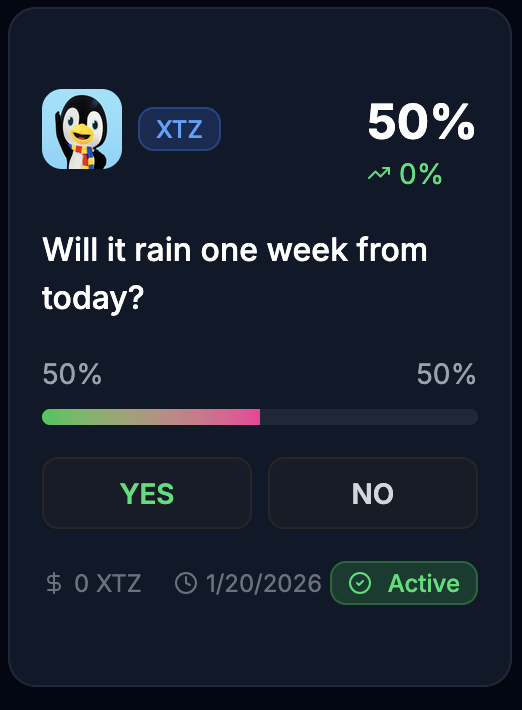
The prediction market appears as a card on the home page, with Yes and No buttons that allow users to place bets:
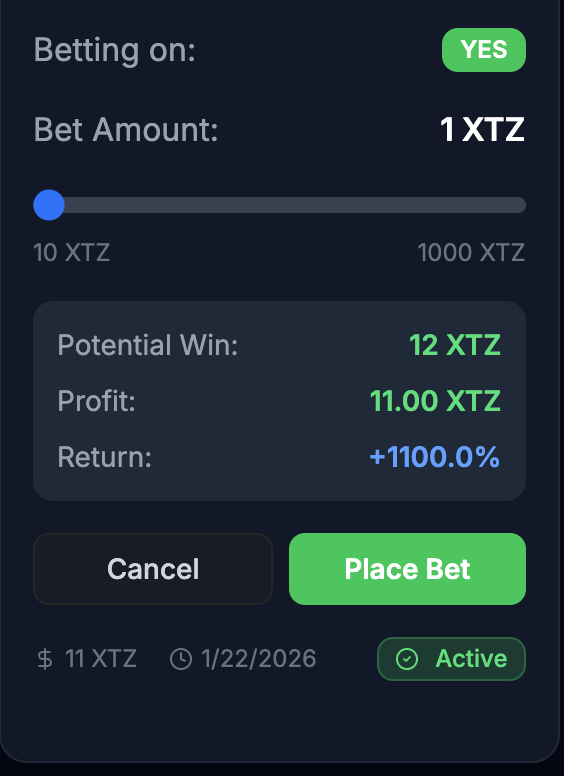
When you click Yes or No, the card expands to show a slider for you to set the amount of your bet in XTZ and a Place Bet button that allows you to submit the bet to the contract:
You can place multiple bets from the same account or different accounts to simulate many users.
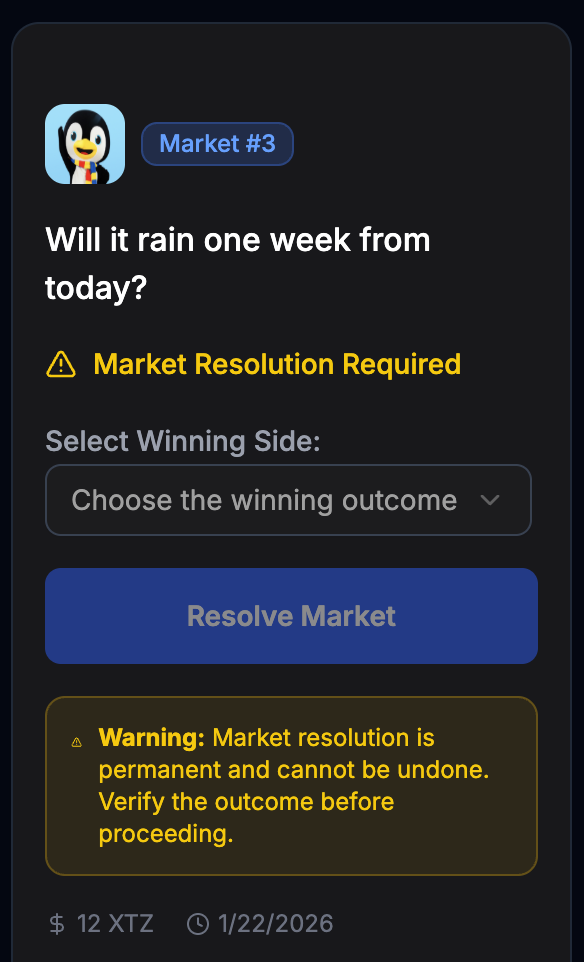
Then, when you are ready to close the market and distribute the winnings, connect to the application with the same account that you used to deploy the contract. Underneath the market card is another card that shows its resolution state:
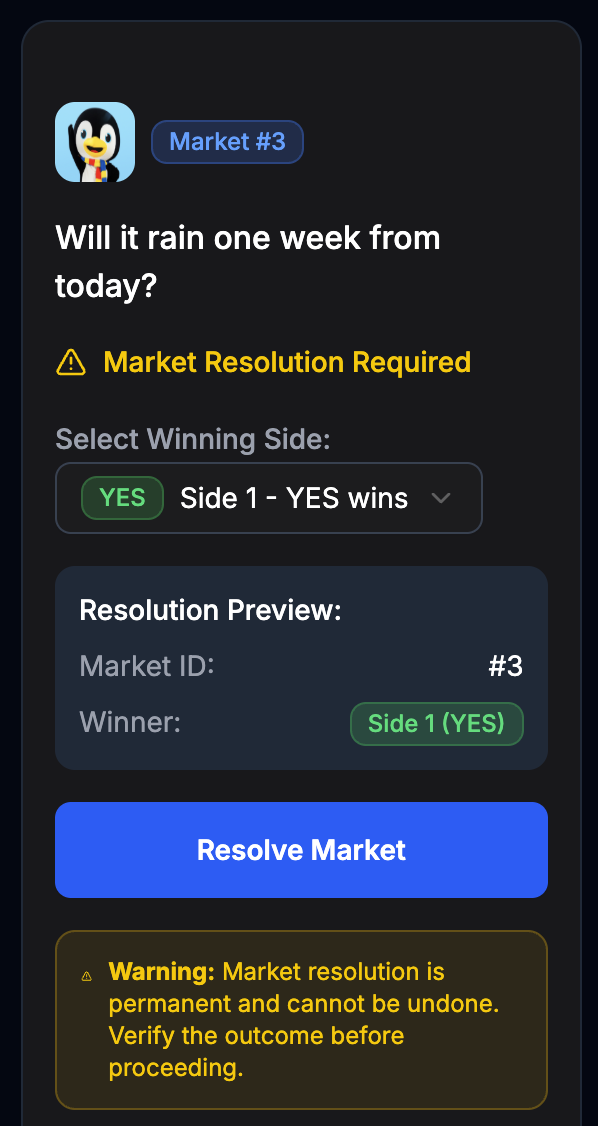
When you are ready to resolve the market (which cannot be undone), select the winning outcome and then click the Resolve Market button:
The market shows that it is resolved:
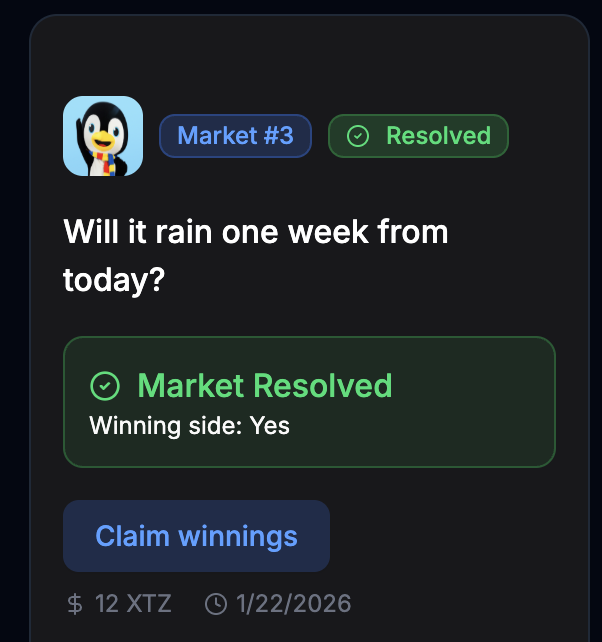
When the market is resolved, the contract does not automatically distribute winnings.
Users must connect and click the Claim Winnings button to call the claimWinnings function to receive their winnings.
Conclusion
Now you now everything you need to deploy simple smart contracts to Etherlink and use them as the backend for web-based applications. From here you can

 Page Outline